MackWeb Hosting
  • 0 Shopping Cart
  • Home
  • Store
    • Browse All
    • Web Hosting
    • WordPress Maintenance
    • Register a New Domain
    • Transfer Domains to Us
  • Knowledgebase
  • Contact Us
  • More
  • Account
    • Login
    • Forgot Password?
  1. Portal Home
  2. Knowledgebase
  3. cPanel - Control Panel
  4. How to create Cronjob via cPanel?

  Categories

Backup/Restore
4
cPanel - Control Panel
24
Databases
11
DNS - Nameservers
6
Domain Management
10
Email
11
FTP
9
Mail Filters & SPAM
8
Mobile
11
Others
3
Security
10
Softaculous
76
WordPress
17

  Categories

  Support

My Support Tickets
Announcements
Knowledgebase
Downloads
Network Status
Open Ticket

How to create Cronjob via cPanel? Print

  • 0

1. Log into your cPanel account.


2. In the Advanced section, click on Cron Jobs Icon.

 

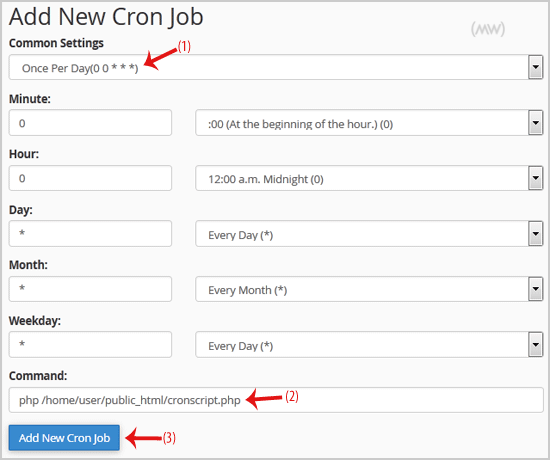
3. Under Add New Cron Job, click on the Common Settings dropdown menu and select an appropriate option such as Once Per Day or another suitable option.

4. Enter your cronjob PHP file location or the command you want to run in the Command field.

5. Click on the Add New Cron Job button.

Was this answer helpful?

Related Articles

How to Reset my cPanel Account Password? If you can access your cPanel account, follow these steps to reset your password:1. Log into your... How to check disk usage of directory and bandwidth usage? If you are receiving a disk space usage warning and don't know which folder is using too much... How to Edit file in the cPanel File Manager? 1. Log into your cPanel account. 2. In the Files section, click on File Manager Icon. 3. cPanel... How to create a new folder or files in the cPanel File Manager? 1. Log into your cPanel account. 2. In the Files section, click on the File Manager Icon. 3.... How to Access cPanel Web Disk? You can use cPanel login details to access your Web Disk, which supports various operating...
« Back

Powered by WHMCompleteSolution

  Support

My Support Tickets
Announcements
Knowledgebase
Downloads
Network Status
Open Ticket
  • Contact Us
  • Terms of Service

Copyright © 2026 MackWeb Hosting. All Rights Reserved.


Loading...
Loading...

Generate Password

Please enter a number between 8 and 64 for the password length